Enter a domain name
XML Sitemap Generator

About XML Sitemap Generator
This XML sitemap generator tool helps you to generate a sitemap for your website in an easy way. This tool is used to generate a sitemap of your site which is helpful for bloggers to get the benefit of Google analytics and the webmaster tool.
What does mean by XML Sitemap Generator?
Simply it is a tool that will give you complete information about your website that helps you in SEO and to check the broken links of your website. It is offered you the SEO Tools Centre which is the no one best SEO tools provider. This tool is very easy and simple to use.
Why use XML sitemap generator tool?
Sitemap generator tool is too beneficial that you do not need to worry about why to use this tool. There are many advantages of using this tool as it gives you the complete sitemap of your website and help you used google analytics in a better way.
It also generates a list of broken list that helps you to maintain your website ranking by repairing those broken links. You do not need any special skills to use the XML Sitemap generator tool as you just have to put your homepage URL of your website. You can simply generate a sitemap through this tool and can benefit from using different web tools like Google Webmaster tools.
You do not need to have any coding knowledge or experience to use this tool. You can get your sitemap in no time without any important skills.
How does SEO Tools Centre Sitemap creator work?
To generate a sitemap of your website through this online Sitemap Generator tool, you need URL of the homepage of your website and some other optional detail. You need to paste the XML file that you generate through this tool in your website. This file contains the XML content, links to the generated files and broken links. First analyze your website meta tags using the meta tags analyzer online and upload this file into the root directory of your website in your Google Webmaster tools log in. When you paste the URL of your website, it starts analyzing your website and making a file of sitemap links and broken links and gives results in no time.
How to create an XML sitemap
- Enter your website address. Type the homepage URL, including https://.

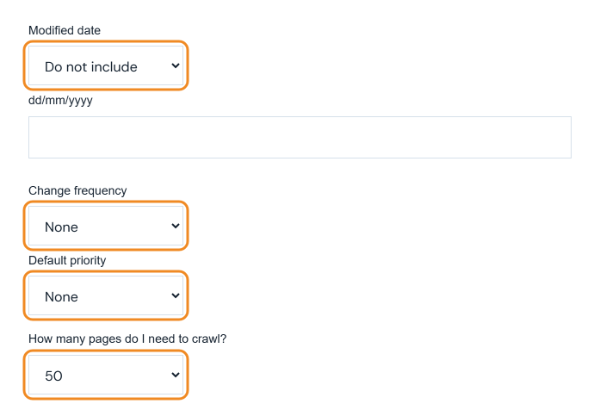
- Choose the options. Modified date can be left out, set to today or set to a custom date. Change frequency and Default priority are optional, and Google ignores them, so None is fine. How many pages do I need to crawl? sets the limit, from 50 up to 5,000 pages.
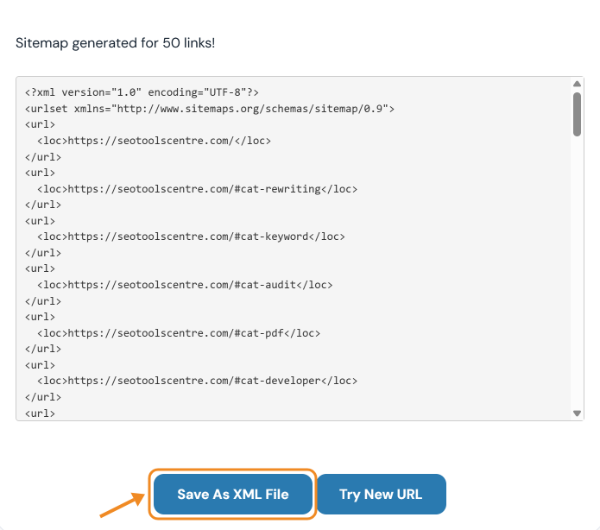
- Click Generate sitemap and save the file. The tool follows the links on your site and lists the pages it finds. Click Save As XML File, upload
sitemap.xmlto the root of your site and submit its address in Google Search Console. Check the list first and remove any URLs you do not want indexed, such as links ending in#.
Last updated: