Plagiarism Changer
Paste your text below, choose its language and click "Remove Plagiarism Now". You can then swap any highlighted word for one of the suggestions before you copy the result.

About Plagiarism Changer
The plagiarism changer rewords a passage by swapping words and phrases for synonyms, which gives you a starting point for writing it in your own words. It suits students, bloggers and marketers who paraphrase sources or refresh old text. It is free, with no sign-up or word limit, but every result needs a human edit and a citation.
How to reword text with the plagiarism changer
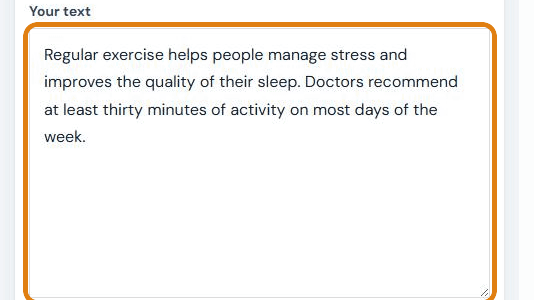
- Paste your text into the "Your text" box, then pick its language under "Select Language".
- Choose a style: "Standard", "Simple", "Formal" or "Fluent". A short hint under the buttons tells you what each one does.

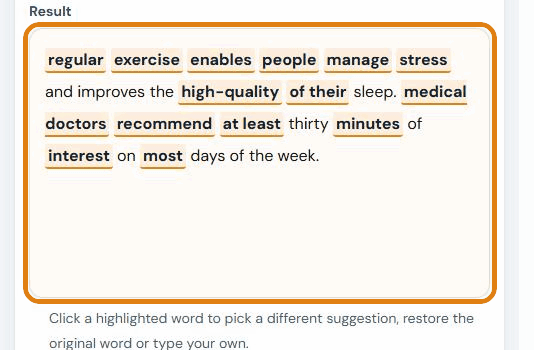
- Click "Remove Plagiarism Now". The reworded text appears in the "Result" box within a few seconds, with every changed word highlighted.
- Review each highlighted word. Click one to pick a different suggestion, restore the original word or type your own. You can switch style at any time, and words you picked by hand are kept.
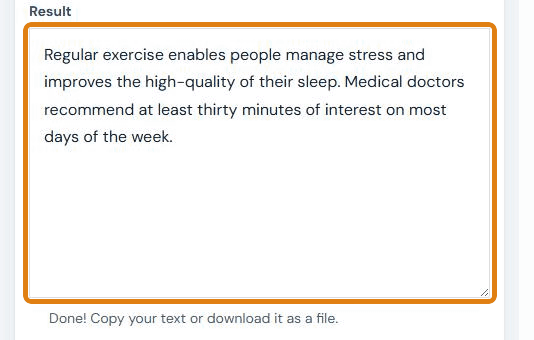
- Click "Finish". Copy the final text from the box, or choose "TXT Format" or "HTML Format" under "Download as a file" and click "Download".
- Polish and check it. Use "Check grammar" or "Check readability" to tidy the wording, then cite your source. "Reword Another Text" clears the boxes for a new passage.
Example: rewording a sentence about exercise
We pasted this 27-word passage into the tool on 6 October 2026 and ran it in each style:
Regular exercise helps people manage stress and improves the quality of their sleep. Doctors recommend at least thirty minutes of activity on most days of the week.
| Style | Highlighted result, as returned | Words or phrases changed |
|---|---|---|
| Fluent | ordinary exercise enables people manage stress and improves the first-class of their sleep. medical doctors recommend at the least thirty minutes of hobby on most days of the week. | 6 |
| Standard | ordinary exercise enables humans manage strain and improves the first-class in their sleep. medical doctors endorse at the least thirty minutes of hobby on maximum days of the week. | 11 |
| Simple | normal workout helps humans manage strain and improves the fine in their sleep. docs advise at least thirty mins of hobby on most days of the week. | 10 |
| Formal | ordinary exercising facilitates human beings manipulate pressure and improves the high-quality in their sleep. medical doctors recommend as a minimum thirty minutes of interest on maximum days of the week. | 12 |
Fluent stayed closest to the meaning. Every style swapped "activity" for a word that changes the sense ("hobby" or "interest"), and turned "the quality of their sleep" into an odd phrase. The highlighted preview starts each sentence in lowercase, but the finished text restores the capitals. Results also vary a little from run to run. After a 30-second edit of the Fluent result, we had this:
Regular exercise helps people control stress and improves how well they sleep. Doctors advise at least thirty minutes of activity on most days of the week.
That edited version reads naturally, but the idea still belongs to the original author. It still needs a citation.
Standard, Simple, Formal and Fluent: which style should you choose?
| Style | What it does | Changes in our 27-word test | Best for |
|---|---|---|---|
| Fluent | Changes fewer words so the text reads more naturally. | 6 | Most texts. Start here. |
| Standard | Balanced word changes. | 11 | A stronger rewrite you are ready to edit. |
| Simple | Picks the shortest, most common words. | 10 | Plain, informal text such as social posts. |
| Formal | Picks longer, more formal words. | 12 | Reports and business writing, after careful review. |
The more words a style changes, the more likely one of them shifts the meaning. Switch between styles on the same text and keep the words that work from each.
What is a plagiarism changer?
A plagiarism changer is a rewording tool that replaces words with synonyms so a passage no longer matches its source word for word. It is also called a plagiarism remover, word changer or text spinner.
Our tool works word by word. For each word or short phrase it looks up alternatives and inserts one, then shows you the other options. It does not reorder sentences or rewrite ideas, which is why you need to edit the result.
Paraphrasing vs plagiarism
Plagiarism is presenting someone else's words or ideas as your own without credit. Paraphrasing means restating a source's ideas in your own words and structure, and it is not plagiarism when you cite the source. Purdue OWL's guide to paraphrasing explains the method used in most schools.
Swapping synonyms is only the first step of a paraphrase. A good paraphrase also changes the sentence structure, keeps the meaning exact and ends with a citation in the style your reader expects, such as APA or MLA. If you need the author's exact words, use a quotation in quotation marks instead.
Does reworded text pass a plagiarism checker?
Not reliably. Plagiarism checkers such as Turnitin compare both wording and sentence structure against their databases, and a synonym swap leaves the structure of the original in place. Use it to help you write, not to hide where an idea came from.
Plagiarism Changer vs QuillBot: which should you use?
Use our tool when you want word-by-word control, long texts and every style for free. Use QuillBot when you want whole sentences rewritten rather than single words, and can work within its free limits or pay for Premium.
| SEO Tools Centre Plagiarism Changer | QuillBot Paraphraser | |
|---|---|---|
| Price | Free | Free plan; Premium is paid, and the price depends on your region |
| Sign-up for free use | No | No |
| Text per run on the free plan | No limit set; 5,000 words took about one second in our test | Up to 125 words at a time (unlimited on Premium) |
| Styles or modes | 4, all free: Standard, Simple, Formal, Fluent | 9 modes; Standard and Fluency are free |
| How it rewrites | Swaps words and short phrases; you choose each replacement | Rewrites whole sentences; a Synonym Slider sets how much changes (partly free) |
| Languages | 7 listed; English gives the best results | More than 20 |
| Getting the result out | Copy, or download as TXT or HTML | Copy All button; document upload |
| Best for | Long texts and careful word-level editing | Short passages that need natural, sentence-level rewording |
QuillBot details are from QuillBot's paraphrasing tool page and help centre, checked 6 October 2026.
QuillBot is the better choice when you need sentence-level rewording, a mode we don't offer, or a language we don't list. Our tool's advantages are the missing word limit, all four styles at no cost, and the ability to accept or reject every single change. Whichever you use, the same rule applies: edit the result and cite your source.
When the tool helps most
- Refreshing your own content: rewording an old product description, blog post or bio for a new page.
- Breaking repetition: finding alternative words when the same term appears too often in your draft. For one word at a time, the Word Changer is quicker.
- Starting a paraphrase: getting a first draft of a source passage that you will rework and cite. For a single sentence, try the Sentence Rewriter.
- Long documents: rewording more than a few hundred words at once. QuillBot's free plan, for example, stops at 125 words per run.
- Learning vocabulary: seeing several synonyms for a word side by side, with the original one click away.
Tips and common mistakes
- Start with Fluent. It changed about half as many words as the other styles in our test, so there is less to fix.
- Watch for words that change the meaning. In a second test, "survey results" became "survey consequences", "most customers" became "maximum clients" and "lower prices" became "lower expenses". Click such words and restore the original.
- Restore names and technical terms. Product names, legal terms, medical words and figures should never be swapped.
- Run it again for different words. Suggestions vary from run to run, so a second run can give a better starting point.
- Change the structure yourself. Reorder clauses, split long sentences and add your own point of view. That is what makes it your writing.
- Check before you submit. Run the final text through the Plagiarism Checker, the Grammar Checker and the Readability Checker, then add the citation.
Limits, accuracy and privacy
- Word-level only: the tool swaps words and short phrases. It does not rewrite sentence structure or check facts.
- Length: no word limit is set. We reworded 5,000 words in about one second, but long texts are easier to review in sections of a few paragraphs.
- Languages: English, Dutch, French, Spanish, German, Turkish and Indonesian are listed. English gives the best results. In our French test, "sommeil" (sleep) became "accoutumance" (habit), so treat other languages as rough suggestions.
- No plagiarism check: this tool rewords text but does not check it against sources. Use a plagiarism checker for that.
- Privacy: your text is sent to the SEO Tools Centre server to look up replacement words. Don't paste confidential or personal information. See the Privacy Policy for details.
- Academic use: many schools limit automated rewriting tools. Check your school's policy before you use one for coursework. For longer essays, the Essay Rewriter lets you work paragraph by paragraph.
Frequently asked questions
Is the plagiarism changer free?
Yes. It is free, needs no sign-up and has no word limit. All four styles and both download formats are included.
Is using a plagiarism changer cheating?
It depends on how you use it. Using it to help you put an idea into your own words, then citing the source, is ordinary paraphrasing. Using it to pass off someone else's work as your own is plagiarism, whatever tool you use.
Will reworded text pass Turnitin or another plagiarism checker?
Not reliably. Plagiarism checkers compare sentence structure as well as wording, and synonym swaps leave the original structure in place. The dependable way to avoid a match is to write the idea in your own words and cite it.
Is paraphrasing plagiarism?
No, not when you restate the idea in your own words and credit the author. It becomes plagiarism when you copy close wording or present the idea as your own without a citation.
How do I remove plagiarism from a Word or PDF document?
Copy the text out of the document and paste it into the tool. For a PDF, convert it to plain text first with the PDF to TXT Converter. Then edit the reworded passage, paste it back and cite your sources.
Is the plagiarism changer better than QuillBot?
It depends on the job. Our tool has no word limit and all styles free, and you control every word. QuillBot rewrites whole sentences rather than single words, but its free plan allows 125 words at a time.
Which languages are supported?
Seven: English, Dutch, French, Spanish, German, Turkish and Indonesian. English gives by far the best results, so check every suggestion carefully in other languages.
How many words can I reword at once?
There is no set limit. In our test, it reworded 5,000 words in about one second, but shorter sections are easier to review and edit.
Sources
- Purdue OWL: Paraphrase: Write It in Your Own Words
- QuillBot Help Center: "What is the difference between free and Premium in the QuillBot Paraphraser?" (checked 6 October 2026)
Last updated: