Word Counter
Enter your text/paragraph here:
About Word Counter
Online word count is the most important factor which is completely understood by the writers, editors, and publisher very well. A Writer gets paid according to the number of words they wrote like salesmen are paid by the number of sales and fishermen is paid by the pond of fish. This word counter tool offered by the SEO Tools Centre is the best online tool to count the exact number of words and characters present in an article. Publisher of a magazine demand article of specific word length to stabilize the quality of the journal.

Words Count matter for every writer in every aspect of whatever he is writing. The number of Words determines the quality of a written thing which may be a news blog, entertainment-related article, or an article based on technology. Something needs more explanation than others therefore a number of characters differ according to the situation and the writer knows well when and how many words he needs to describe one thing according to its importance.
What is Word Counter Tool?
Word Counter Tool is the most fantastic tool available online which is used by millions of writers to counts the exact number of words and characters in a document. They use this tool to know the quality of their writing and to improve it so that they can provide a high quality work with the proper length of characters.
Why use the SEO tools center word counter online?
- It is very necessary to keep the length of the article according to the quality. The length of the text should be according to the interest of the audience or reader.
- Use a tool that gives 100 % accurate and reliable result because words act as the backbone of an article. It is a free tool to use and get the volume of characters in a document.
- It's very easy and simple to use this tool, just paste your article and get results. That's the fast tool and gives result in no time without making any mistake.
How does this Character count tool work?
When you paste your article into the given box of the tool, it will analyze the text and count the words used in that text, works similar as the sentence counter and also count the characters and then give a result showing the total number of words and characters separately respectively.
How to count words and characters
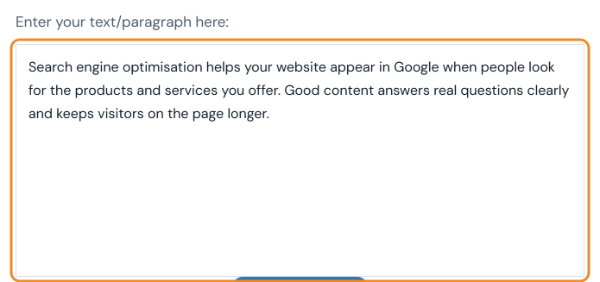
- Paste or type your text. Put it in the Enter your text/paragraph here box. You can paste a whole article.
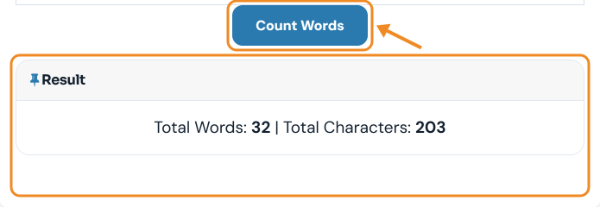
- Click Count Words. The result shows the total words and total characters (including spaces), here 32 words and 203 characters. Use the word count for essays and article briefs, and the character count for limits such as meta descriptions or social posts. For sentences and paragraphs, use the Sentence Counter.
Last updated: