Everything runs in your browser. Your list is never sent to our server.
Last updated: 10 October 2026
The comma separator turns a list with one item per line, such as a column copied from Excel, into a single line of comma-separated values. It suits anyone preparing SQL queries, tags, CSV rows or code arrays. It is free, needs no sign-up and runs entirely in your browser, so your list never leaves your device.

How to convert a list to comma-separated values
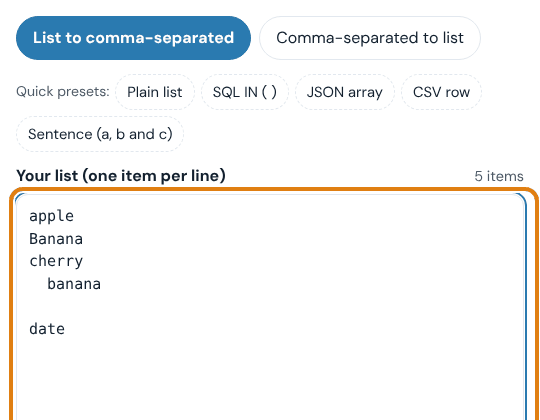
- Paste your list. Copy a column from Excel, Google Sheets or a text file and paste it into "Your list (one item per line)". The counter above the box shows how many items it found.
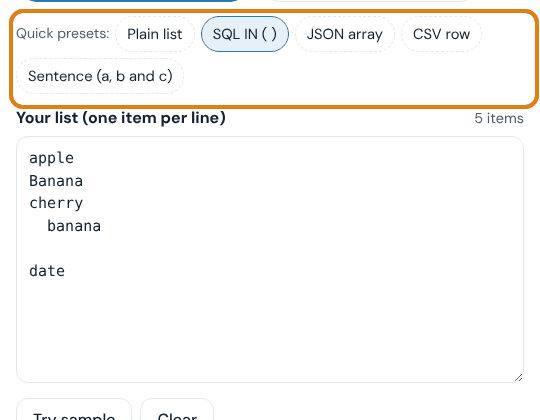
- Pick a preset or a separator. Click a quick preset such as "SQL IN ( )" or "JSON array", or choose your own "Separator" and "Wrap each item in" settings under Options.
- Clean the list if needed. Tick "Remove duplicates", choose a "Sort" order or change the "Letter case". "Trim spaces" and "Remove empty items" are on by default.
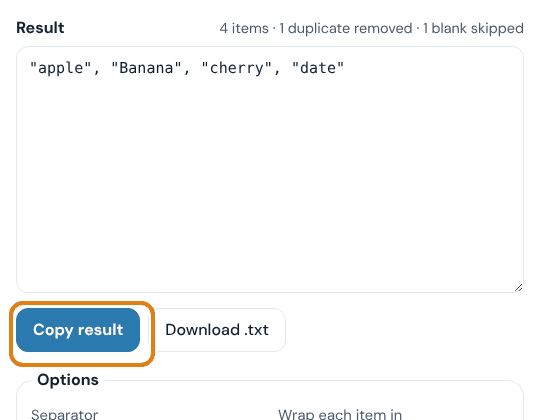
- Copy or download the result. The result updates as you type. Click "Copy result" to copy it, or "Download .txt" to save it as a file.
To go the other way, click "Comma-separated to list" at the top. The tool then splits comma-separated text back into one item per line.
Example: a messy column turned into clean values
We pasted this six-line list, with a duplicate in different case, extra spaces and a blank line:
| Input (one per line) | Settings | Result |
|---|---|---|
appleBananacherry banana (blank line) date | Comma and space, double quotes, remove duplicates | "apple", "Banana", "cherry", "date" |
O'Brien42Smith | SQL IN ( ) preset | ('O''Brien',42,'Smith') |
Smith, Johnsay "hi"plain | CSV row preset | "Smith, John","say ""hi""",plain |
In the first row, the counter reported "4 items · 1 duplicate removed · 1 blank skipped". Duplicates are matched without regard to case, and the first spelling is kept. In the SQL row, the apostrophe in O'Brien was doubled so the query stays valid, and 42 was left unquoted as a number. In the CSV row, only the items that contain a comma or a quote were wrapped in quotes.
Options explained
| Option | What it does | Best for |
|---|---|---|
| Separator | Puts comma and space, comma only, semicolon, pipe, tab, space, new line or your own text between items. Two sentence styles give "a, b and c" or "a, b, and c". | Any target format; sentence styles for writing |
| Wrap each item in | No quotes, double, single, backticks, quotes only when needed (CSV rule), or escaped JSON strings | SQL, CSV, JSON and code |
| Wrap whole result in | Adds ( ), [ ] or { } around the full result | SQL IN lists, arrays, sets |
| Sort | Keeps the order, sorts A to Z or Z to A (item2 before item10), sorts numbers smallest first, or reverses the list | Tidy, comparable lists |
| Letter case | Keeps case, or changes everything to lowercase or UPPERCASE | Tags, emails, codes |
| Add before / after each item | Adds fixed text to every item, such as # or .com | Hashtags, domains, file names |
| New line every N items | Breaks the result into lines of N items | Batches, long lists |
| Trim spaces / Remove empty items | Removes spaces around items and skips blank lines (both on by default) | Data pasted from spreadsheets |
| Remove duplicates | Keeps the first copy of each item, ignoring case | Keyword and email lists |
| Escape quotes inside items | Doubles a quote that appears inside an item, so 'O'Brien' becomes 'O''Brien' | SQL and CSV |
| Leave numbers unquoted | Keeps plain numbers such as 42 or 3.5 without quotes | SQL IN lists of IDs, JSON |
The tool remembers your options in this browser for your next visit.
What comma-separated values are
Comma-separated values (CSV) is a plain-text format in which a comma divides one value from the next. A delimiter is the character that does the dividing; a comma is the most common, but tabs, semicolons and pipes are also used. CSV files are described in RFC 4180. It says a value that contains a comma, a quote or a line break must be wrapped in double quotes, and a quote inside it must be doubled. The "Only when needed (CSV rule)" setting follows that rule.
Why some files use semicolons
Many European countries write decimals with a comma (1,5 instead of 1.5). Excel in those regions often saves "CSV" files with semicolons so the numbers are not split apart. If your numbers contain decimal commas, choose "Semicolon" as the separator.
How to make a comma-separated list in Excel or Google Sheets
You can also join cells with a formula. In Excel 2019 or later, Excel for Microsoft 365 and Google Sheets, =TEXTJOIN(", ", TRUE, A1:A100) joins A1 to A100 with a comma and a space, and skips empty cells. Excel's limit is 32,767 characters per cell, so very long lists are easier in the comma separator. The tool also adds quotes, removes duplicates and sorts, which a formula alone does not.
Comma Separator vs Word Combiner
Use the comma separator to join one list into one line. Use the Word Combiner to build every combination of words from several lists.
| Comma Separator | Word Combiner | |
|---|---|---|
| Input | One list, one item per line | Two or three word lists |
| Output | One line of values with your chosen separator | Every combination of the words, one per line |
| Extra options | Quotes, sort, dedupe, case, prefix and suffix, presets | Combination settings |
| Best for | SQL, CSV, JSON, tags, email lists | Keyword ideas, domain name ideas |
When to use the comma separator
- SQL queries: turn a column of IDs or names into an IN list such as
('a','b','c'). - Developers: paste values into a JSON, JavaScript or Python array without typing quotes and commas.
- Bloggers and YouTubers: turn a keyword list into comma-separated tags.
- Email lists: join addresses for the To or Bcc field, with duplicates removed.
- Writers: make a readable sentence list such as "red, green and blue".
- Spreadsheets: fold an Excel column into a single cell or a CSV row.
Tips and common mistakes
- Turn on "Leave numbers unquoted" for numeric SQL columns. The database then compares numbers with numbers instead of converting text.
- Split long SQL lists. Oracle allows at most 1,000 values in one IN list. Set "New line every" to 1000 and run each line as its own IN list.
- Don't add quotes by hand for JSON. Use the "JSON array" preset, which escapes quotes and backslashes correctly.
- Check for hidden duplicates. "Banana" and " banana " count as the same item when "Trim spaces" and "Remove duplicates" are both on.
- Keep commas inside values safe. For a CSV file, use the "CSV row" preset so values such as "Smith, John" stay in one field.
Limits, accuracy and privacy
The comma separator runs in your browser with JavaScript. Your text is never uploaded or stored on our server. In our test, a 100,000-line list was de-duplicated, sorted and quoted in about 0.4 seconds. Very large lists depend on your device's memory. "Sort A to Z" follows your browser's language rules. "Numbers, smallest first" reads the first number in each item and puts items without numbers last. The tool formats text only; it does not check that your SQL or JSON is valid for your system.
Frequently asked questions
What does comma-delimited mean?
Comma-delimited means each value is separated from the next by a comma. "apple, banana, cherry" is a comma-delimited list of three values.
How do I convert a column to a comma-separated list?
Copy the column, paste it into the comma separator and click "Copy result". Each line becomes one value, and the separator is added between them automatically.
How do I make a quoted list for an SQL IN clause?
Click the "SQL IN ( )" preset. It wraps each item in single quotes, doubles any apostrophes, leaves numbers unquoted and adds brackets around the list.
Can I use a semicolon, pipe or tab instead of a comma?
Yes. Choose it in the "Separator" menu, or pick "Custom…" and type any text, such as " OR ".
What happens if an item already contains a comma?
With the "CSV row" preset, that item is wrapped in double quotes so it stays one value. With other settings, it is kept exactly as you typed it.
Can I turn a comma-separated list back into a column?
Yes. Click "Comma-separated to list", paste your text and choose what to "Split on". Commas inside quoted values are not split.
Does the comma separator add a trailing comma?
No. A separator only goes between items, never after the last one.
Is my data uploaded or saved?
No. Everything happens in your browser. Only your option settings are remembered on your own device.